Overview #
Introduction: The ThinkPad USB Adapter provides legacy ThinkPads with essential USB connectivity for modern peripherals.
Machine Type 5017 · 1998+ · 6 sections
USB adapter accessory.
Introduction: The ThinkPad USB Adapter provides legacy ThinkPads with essential USB connectivity for modern peripherals.
Battery Asm
To remove the battery Asm:
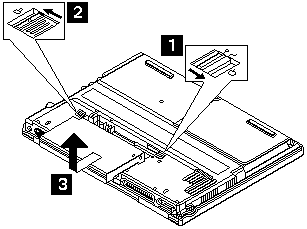
Reverse the steps described above when installing a new battery pack.
Note: Make sure you use the correct screw for replacement.
1030 Keyboard
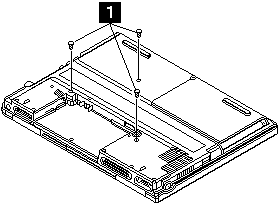
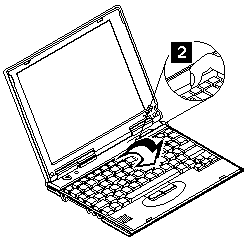
To remove the keyboard:
Turn the notebook over, then lift the keyboard as shown.
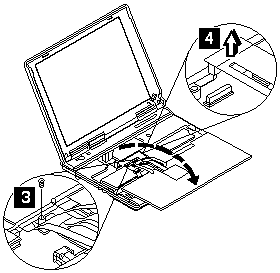
| Step | Size (Quantity) | Head & Color | Torque |
|---|---|---|---|
| 1 | M2.0 x 9 (3) | Flat head, black | 2.5 kgf-cm |
| 3 | M2.5 x 6 (1) | Flat head, black | 2.5 kgf-cm |
Note: Make sure you use the correct screw for replacement.
Water Channel Asm
To remove the water channel Asm:
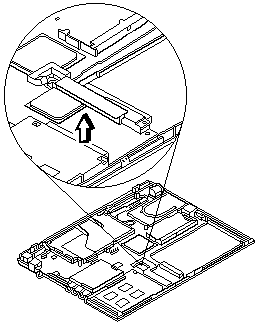
Note: Make sure you use the correct screw for replacement.
Hard Disk Drive
 -Warning-
The hard disk drive is sensitive to physical shock.
Incorrect handling can cause damage and permanent loss of data on the drive.
To remove the hard disk drive:
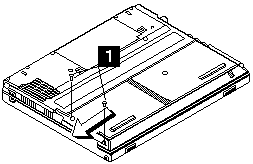
Slide the hard disk drive module as shown.
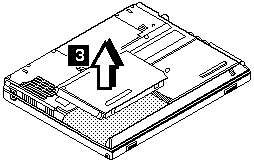
| Step | Size (Quantity) | Head & Color | Torque |
|---|---|---|---|
| 1 | M2.5 x 7 (2) | Flat head, black | 2.5 kgf-cm |
Note: Make sure you use the correct screw for replacement.
Note: The Cu tape must be reseated firmly after the LCD unit Asm is replaced -3-.
Note: Make sure you use the correct screw for replacement.
LCD Unit Asm
Note: The Cu tape must be reseated firmly after the LCD unit Asm is replaced -3-.
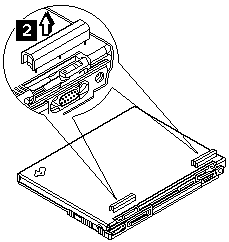
To remove the LCD unit Asm:
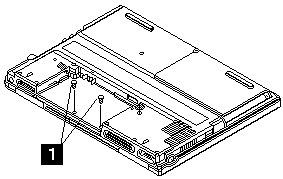
Turn the notebook over, then remove the hinge covers.
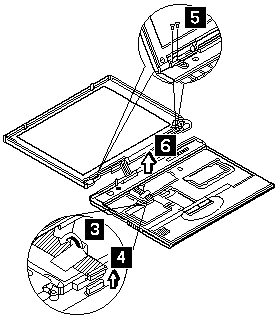
| Step | Size (Quantity) | Head & Color | Torque |
|---|---|---|---|
| 1 | M2.0 x 4 (2) | Flat head, black | 2.5 kgf-cm |
| 5 | M2.5 x 6 (4) | Flat head, black | 3.5 kgf-cm |
Note: Make sure you use the correct screw for replacement.